
Language Features
Everything on this page is provided by the bundled WitcherScript LSP. Open any .ws file in a project with a configured game directory to use them.
Diagnostics
Syntax errors and validation warnings appear as you type:
- Parse errors
- Type mismatches
- Unknown types, members, functions, methods, and identifiers
- Duplicate top-level symbols
- Duplicate locals and parameters
vardeclarations after executable statements- Locals or parameters that shadow class fields or
redscripts.iniglobals - Fields that shadow a field from a parent class
- Missing or duplicate
wrappedMethod(...)calls inside@wrapMethodbodies - Overrides that change the parameter count or weaken the original's access modifier
- Invalid
eventreturn types, or areturnvalue that does not cast tobool - Integer literals too large for an
int, and string literals containing a raw newline newor a function call used as a default field value- Modding annotations targeting a state's backing class, or modifiers on a
@wrapMethodfunction - ... and more.
Full type checking flags type mismatches across assignments, variable initializers, and call arguments and returns, following the conversions the WitcherScript compiler actually allows.
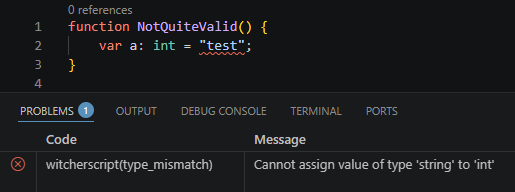
Diagnostics scope
witcherscript.diagnostics.scope controls which files are diagnosed. It is live-switchable - change it and the Problems list updates.
| Value | Behaviour |
|---|---|
workspace (default) | Diagnose every .ws file in the project on startup. The Problems list shows diagnostics for all workspace files. |
openFiles | Diagnose only the files currently open. Symbols are still indexed project-wide so navigation and completion work everywhere, but the heavy whole-project checking is skipped. |
none | Suppress all diagnostics. |
Unused symbols
Locals, parameters, and private fields that are never used are dimmed in the editor, so dead declarations stand out at a glance.
Completion
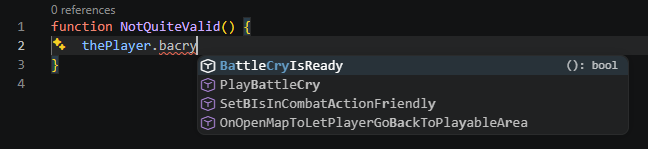
Completions are offered for members (after . and :), types, locals, this-shorthand members, globals, statement keywords, and modding-annotation parameters. Function and method completions expand to snippets with parameter placeholders.
Completions appear immediately as you type.


Hover
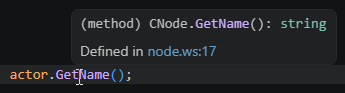
Hover over a symbol for its type signature, annotations, and a file-line link to its declaration.
Navigation
- Go to Definition - jump to a symbol's declaration, across files.
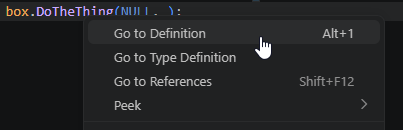
- Go to Type Definition - jump from a variable, field, or return type to its type's declaration. Generics target the constructor (
array<CFoo>→array), enum members target their owning enum, and primitives produce no target. - Find References - find every use of a symbol, workspace-wide.
- Workspace Symbol Search - jump to any class, function, enum, or other symbol across every
.wsfile in the project (Ctrl+T). Legacy-overridden base scripts are hidden, so you don't see duplicates.
Document highlight
Put your cursor on a symbol and every other use of it in the current file is highlighted, so you can see where a variable, field, or function is read and written at a glance.
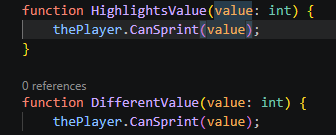
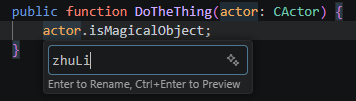
Rename
Rename a symbol across the whole workspace. Renames are rejected on read-only base game scripts.

Signature help
Inside a call, parameter hints show the signature with active-parameter tracking as you move between arguments.

Inlay hints
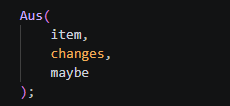
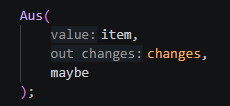
At each call site, the editor shows the parameter name every argument fills, so you can read which value goes where without opening the signature.
out parameters
An argument passed as an out parameter will still show the hint when the names match.
Inlay hints use VS Code's standard control (editor.inlayHints.enabled). The walkthrough offers the four modes, and a visual switcher that sets the value for WitcherScript only.
Hiding inlay hints
Off unless pressed is strongly recommended - the hints stay out of the way, and you reveal them by holding Ctrl+Alt.
| Normal | Peeking: Ctrl+Alt pressed |
|---|---|
 |  |
Document Symbols
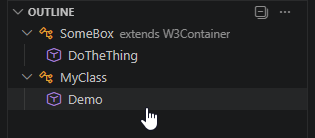
The outline shows nested classes, structs, enums, functions, methods, states, events, and fields for the current file.
Semantic highlighting
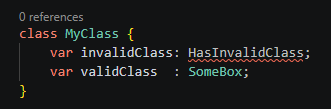
Highlighting is driven by the server, so only valid variable and type names are coloured - mistakes stand out instead of being painted as if they resolved. Engine globals such as thePlayer and theGame highlight as variables with the defaultLibrary modifier; a workspace class of the same name still wins and highlights as a class.
Code lenses
Two independent code lenses sit above declarations. Each is toggled separately.
Overridden symbols
witcherscript.codeLens.overriddenSymbols (on by default) shows a game definition lens above each top-level symbol in a legacy override script that shadows a base game symbol. Clicking it runs Go to Base Definition and jumps to the original.
Reference counts
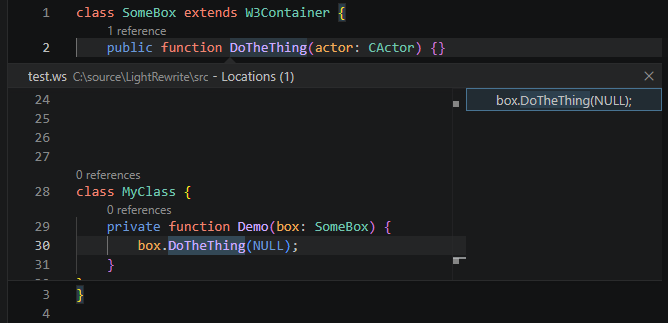
witcherscript.codeLens.references (off by default) shows an N references lens above each top-level declaration and class method. Clicking it runs Show References and opens the references panel. You can turn this on from the walkthrough or settings:
{
  "witcherscript.codeLens.references": true
}
Code actions
Refactors and rewrites are offered through the lightbulb (Ctrl+.).
Refactor
- Extract to variable - pull the selected expression into a new
varabove the statement. An inline rename opens straight away so you can name it without a separate step. - Extract to function - turn the selection into a new named function, with the parameters it needs filled in for you.
- Extract to method - lift the selection into a new
privatemethod on the same class. - Inline variable - replace a local with its value everywhere it is used, then drop the declaration.
- Split / join declaration - split
var x : int = 5;into a declaration and a separate assignment, or join them back together.
Layout
- Collapse / expand
switch- with the cursor on aswitch,case, ordefault, collapse every case onto one line, or expand each onto its own. Case bodies are copied verbatim, not reformatted. - Collapse / expand
if/else- the same toggle forif/else if/elsechains.
Witcher 3 modding awareness
The server understands the modding annotations:
- A method / field added with
@addMethod/@addFieldbecomes a real member of that class - it shows up in completion, hover, Go to Definition, and Find References everywhere the class is used, just like a built-in member. - After
@wrapMethod(Class)or@replaceMethod, the class's overridable methods are offered immediately.- The entire
functionsignature including parameters will be completed automatically. - Wrapped methods also generate the
wrappedMethod()macro with all parameters.
- The entire
- Inside a
@wrapMethodbody, Go to Definition, hover, and Find References on the specialwrappedMethodcall will go to the original, wrapped method.

Press enter to get:

Synthetic / virtual built-ins
The built-in array<T> generic is available with the standard methods (PushBack, PopBack, Insert, Erase, EraseFast, Clear, Size, Last, Contains, FindFirst, Grow, Remove, Resize).
The language server understands arrays, state backing classes (e.g. CR4PlayerStateExploration), and a handful of classes never declared in base files OR shared imports. It keeps virtual definitions of them, allowing them to be used normally - including Go to Definition, which will open a read-only, auto-generated source file for you to see.